Tuesday, October 16, 2018

How To Easily Master Social Media Marketing For Small Businesses And Startups – Step By Step
small businesses and startups can easily master social media marketing

Do you want to gain more followers online? Do you want to find out the best ways to master social media marketing for small businesses and startups with ease?
As a small business or a startup owner, you surely know that there is a lot to perform with limited resources.
While conventional marketing can be a wasted investment, social media marketing is cost-effective and helps you to directly engage with your current and potential audience.
One way or another, marketing is a trade-off. What you save in time, you will invest in dollars and reverse. You have to be efficient and plan your resources smartly in order to achieve desired results.
So, if you want to start using social media to market your services and products, you are definitely going to love how easy and simple the process is. So, let’s begin.

1. Build Up A Robust Social Media Marketing Strategy


build up a robust social media marketing strategy

In the world of social media, it is all about building a robust social media strategy and connecting with your target audience. To achieve this, you need to know your customer’s needs. So, that’s the first thing to start off - defining your audience. Or as we call it – creating your perfect user AVATAR
That means you need to create character profiles by gender, age, profession, interests etc. Find out every detail and also find images that outline your audience. 
Based on the features of your targeted audience, address what are the key concerns and problems you can solve. Work on those pain points for each character separately and try to find a solution. After understanding the pain points, write down some important messages you want to present to your audience.
Now that you have defined both your audience and message, analyze which social media channels they prefer. Every social media channel has a different audience and focus. Understanding the differences between social media channels is of high importance, in order to increase your efforts on the right channels.

Tuesday, October 9, 2018

Social Media Image Dimensions Popular In 2018


People are attracted by visuals every time they open a social media profile page. In fact, social media images are likely to be seen first rather than any other thing on your profile. There are so many tools that can help you create attractive and engaging images, but first you'll need to find out which sizes and dimensions can make you create more engagement and improve your brand.


Since social media networks are constantly outgrowing each other, we cannot allow ourselves to lose future prospects So, creating attractive images is very important to attract more audience.

Cover photos are the most important on profile pages, whether it is Facebook, LinkedIn, or Twitter. Usually, people will first see your cover photo before any other posts. 

What Is The Ideal Cover Photo Size For Social Media Platforms Like Facebook?

 Facebook

Cover photos should be 820 x 312 pixels. There are some details that you should take in mind when considering a cover photo for your profile. 
  • Cover photos are different for mobile phones.
  • Cover photos can be repositioned on the desktop.
  • Cover photos may be covered by your profile photo or name.
  • Cover photos are only half shown when someone visits your profile.


Monday, October 8, 2018

The Best Time To Post On Your Social Media Networks – Populizr Study


 the best time for posting on social media networks


Are you wondering what is the best time of the day for posting on your social media networks?
Is the engagement time different on Facebook, Instagram or Twitter?
Creating and posting unique social media content is not working without setting a timing strategy. The key to setting up a successful social media engagement is posting unique content during the best hours and days for the audience you are targeting. The “peak hours” are changing periodically – true, but if you are paying attention to the times when your targeted audience is active on social media networks, you will definitely increase your traffic and shares.

Well, the peak hours of posting are different on each social media network. In this article, you will see what is the best time for posting on:

  • Facebook,
  • LinkedIn,
  • Twitter,
  • Pinterest,
  • Google+ and
  • Instagram.

Facebook’s Best Posting Times

facebook posting time populizr


We can definitely name Facebook “The Social Media King” since it has over 1 billion active users per month. However, since Facebook is constantly changing, it’s not that easy to set your organic posts in front of your whole targeted audience.
Facebook is obviously an active spot from Monday to Sunday so, it is very unlikely for you to do something wrong when finding the best posting time.
Still, there are a few significant times, days and patterns that should help you:

  • Monday through Sunday between 9 a.m. and 3 p.m. is relatively safe posting time
  • The least optimal posting times are early mornings and late nights
  • Wednesday through Sunday are the strongest posting days
  • Thursday is the most recommended posting day
  • 1 p.m. on Thursday is the most active time

Scheduling Facebook Posts: Why And How To Do It?


If your social media marketing team dedicates some time to post on Facebook, they most certainly know that not every hour is good for posting.

Your audience is not active all the time, and it’s your teams' task to find out the most appropriate hours to do so.

A scheduling tool can help with this time-consuming job.
And if you want to know more about this, please continue reading.

How Should You Organize Your Facebook Posts? 

Your users are on Facebook at all times. But they don’t always engage with your content.

Your social media team should find out the hours when your audience is the most active. In general, the Facebook audience is most active:

•    Between 9 am and 3 pm from Monday to Sunday;
•    From Wednesday to Sunday are the most active posting days;
•    The most recommended and productive time for posting is Thursday at 1 pm.

If you use scheduling tools for this, your team will be more productive and effective. Populizr is a tool that can help here.
It’s an application that has several options for posting on a daily basis. You can use promotional or standard posting scheduler; you can use an evergreen type of posting or custom.

Also, you can view the entire process through different available views such as overall preview, monthly view, and hourly view.
It all depends on your different needs as a business and how much you want to interact with your audience.

However, having a tool like Populizr can make this entire process much easier. Your team will be able to schedule a whole month work in just a few hours, and they can dedicate themselves on much more significant tasks.

Friday, October 5, 2018

What Reach And Impressions Mean In Social Media?


Many small businesses don’t make a difference between terms Reach and Impressions, or they don’t understand them.
If you want to grow your audience in social media networks you need to know the correlation between them, so continue reading and learn how they are measured.

Social Reach or how big your virtual audience is. For example, if you have 5000 followers that means that the number of people that you could reach will be 5000 also.

Social Impressions or the number of times that your post has viewed, whether they clicked or not. That means that if you see 5 times one post shared from different people, you made 5 impressions on that post.

Difference between Reach and Impressions
Reach number will be always smaller than the number of impressions. Independently how much times you will see some post you can increase the number of Reach for once. On the other hand, impressions measure how much times that post is seen. Independently who shared that post.

All companies want to reach more people and get traffic on their site. However, that is not the end goal. Reach and impressions will drive people to take action and social media needs to get conversions that will help companies to pay their bills.

Thursday, October 4, 2018

5 Tactics For Increasing Your Share Of Voice On Social Media

This is an excerpt of 5 Tactics For Increasing Your Share Of Voice On Social Media

Is your brand voice recognized on social media? Does your brand come up in the conversation when people talk about the same product type as you sell? If your brand doesn’t come up in conversations and it’s not recognized on social media, then you have a problem.

Are You Wondering How To Solve This Problem?


Today, social media is becoming more and more competitive. To overcome this issue, you need to learn how to boost your brand voice and fight your way to the top. Read on and see how you can increase your voice on social media by using the following five tactics:

1: Be Active 

If you want your brand voice to be heard on social media, you need to be constantly active.

If you only post to Instagram once or twice a week or Tweet once a day, your audience will overlook you and quickly forget you. There are millions of active users on all of the major social media networks, so if you want your brand voice to be heard, you need to compete with them.

It’s important to post regularly on the social media networks, but pay attention not to spam your audience. To achieve this, you can start by creating a social media calendar. That’s the easiest way to share your brand voice and not spam your audience.

2: Engage With Your Audience


Unfortunately, being active and posting content constantly is not doing the complete job. A common mistake is to think that social media is only for content distribution. That’s not the case here.

Social media gives you a chance to engage and interact with your audience. Sadly, many brands forget to engage with their audience, and the interaction between them is lost. So, try not to repeat this mistake and interact with your audience as much as possible.

Tuesday, October 2, 2018

Tips For Choosing The Right Social Media Agency For Your Business


Are you still trying to manage all of your clients' social media channels by yourself? You waste your time and energy and still don't have any result? Maybe it’s time to consider a social media agency.

Here some tips that will help you decide which social media agency is the right for you.

Have A Goal!

Before you choose an agency, you need to know what you want to achieve. Knowing this will help you with searching for an agency that is perfect for your business. And what's the best place for research if not the Internet?

Things You Need To Pay Attention To

  • A marketing agency can work in the field of Social Media Marketing, Content Marketing or Digital Marketing. Choose the right one that fits for your business.
  • Choose an agency that has experience in your field of work.
  • Find Social Media Agency that gives a detailed report on every activity on your posts.
  • If you want to be successful, you need an agency that develops a different strategy for each client.
  • Find an agency that uses social media tools. We recommend you to try Populizr.
  • You will know that the agency is right for you if it provides you with a precise explanation of why you need Social Media Marketing.
I know that it’s hard to find an agency that will be strong in all the things we've listed above, so try to choose the one that is close to these tips. Choosing the right Social Media Agency will bring your business many benefits.


Monday, October 1, 2018

Beyond Clicks, Shares, Likes: What Really Matters In Lasting, Effective Social Media Marketing Campaign

This is an excerpt from Beyond Clicks, Shares, Likes: What Really Matters In Lasting, Effective Social Media Marketing Campaign


Social media marketing is an effective way for agencies to build a better brand experience with their customers and generate more leads. However, not many know how to create a solid community and expand their businesses.

Have you asked yourself what do you want to achieve for your business? Or how much time can you set aside for managing your client’s social media profiles?


If you don’t have someone or something that can manage your social media campaigns, your business is likely to waste a lot of time and money.

Digging Deeper Beyond The Most Important Social Media Metrics

Agencies often forget the main purpose of social media marketing and start only to count on clicks, likes, and shares.

But actually, social media marketing is more than just a tool for social engagement. Social scheduling applications usually deal with scheduling a single post at a certain period of time to get a certain amount of likes, clicks, and shares… But do you really want to bother with the numbers? Will these numbers bring success to your agency?

Numbers are just numbers.

We usually get excited about looking at and counting likes, shares, and clicks, and tend to forget that social media engagement is not the main key to success.


So, what exactly can you do to create an effective social media marketing campaign?

Wednesday, September 26, 2018

5 Ways To Manage Effective Social Media Marketing Teams


To have an effective social media marketing team means that you will manage to satisfy any client’s needs.

However, this is not always the case. 

Your team could still spend too much effort and time to create social campaigns that don’t provide any valuable results. 

At this point, you might ask yourself the question: how you will manage to keep your clients if you don’t provide the service they expect?

The answer is by using the social media marketing the right way. 
Thanks to it, your team can increase the social traffic for your clients, bring them more qualified leads and eventually, increase the sales. 

And you can manage all of this without having to hire a new marketing team, but with increasing the productivity of your existing team.

How will you do that? 

Read these 5 management tips and bring your effective social media marketing team to the level that will always meet your client's needs: 

1. Your Clients Want You To Post Unique And Frequent Content

It’s not enough that your copywriting team post frequently on every social media that is relevant for your client’s needs.

It’s even frowned upon nowadays. 

But frequent posts are not enough to increase the engagement rates and bring more social traffic. 

What increase the rates, the number of valuable leads and ultimately, the sales is the creation of a new, unique content. And posting that content to different social platforms.

Failing to do this, your social media team increases the chances to create duplicate content – reading the same content on all different social media. It will bore the users, and they will not want to engage with your content in any way. 

One way to avoid this is by using social scheduling tools. You can create unique content and post it regularly on different social platforms without spending too much time and effort.


The Average Lifespan Of Your Social Posts

What Is The Average Lifespan Of Your Social Posts?


As we all know, people spend most of their free time on social media. But, do you know the average lifespan of your social media posts?
Here we have the answer as well as how often you should post with Populizr: 

·        Twitter- the average lifespan of your tweets is 18 minutes. That means that if you want your posts to be seen you need to post more often. We recommend sharing each social campaign for 1 month, once a day (Scheduling Type-Standard).
·        Facebook – the average lifespan is 5 hours. So, you need to post up to 3 times per day. And, we recommend sharing posts with Populizr twice a week for 1 month.
·        LinkedIn – in comparison with Facebook or Twitter, the average lifespan of your posts lasts longer on LinkedIn.  So, we recommend posting only once per day.
·        Google+ - it is hard to define the average lifespan because of the followers. If your audience follows a lot of people your post will not last long in their feeds. So, we recommend posting 3 times a day.
·        Instagram – it is also difficult to define the average lifespan of your posts on this network because of the number of followers that your followers have. So, try to share great photos because the chances they to be seen many times are lower.
·        Pinterest keeps posts forever. They will show up to your target audience in the time when you want them to be seen. Thus, you will need to optimize them before posting. We recommend 3-5 times posting a day without pinning all photos at once. 

No matter which social platforms you will choose, make sure you have an effective social media marketing strategy in hand, that will target the right audience with valuable content. And, don’t forget to use Populizr to easily manage and schedule social media posts.


Monday, September 17, 2018

How To Minimize Social Media Work In 10 Minutes Top

This is an excerpt from How To Minimize Social Media Work In 10 Minutes Top

Having Doubts On How You Can Minimize The Amount Of Social Media Work For Your Business?

social media work doubts

Today, you can find many social media tools that can help you save a lot of your time in doing your social media work. So, believe us when we tell you that there is nothing for you to worry about. Many of those social media tools provide beneficial features, but only a few of them offer unique features. As an example, we can take Populizr. Populizr is one of those tools that provide unique features that will minimize your social media work as much as possible. Wondering how you can achieve that?
Here are few unique features that only Populizr provides and can be helpful for you:

1. Generating The Content

Populizr simplifies the whole process of generating the content as much as possible. The main role here is that Populizr is capable of creating 25 unique variations from a single blog post. So, you can say goodbye to the idea of writing 25 unique variations by hand. Populizr does the whole process automatically which saves you plenty of time.

25 unique variations

2. Scheduling The Content

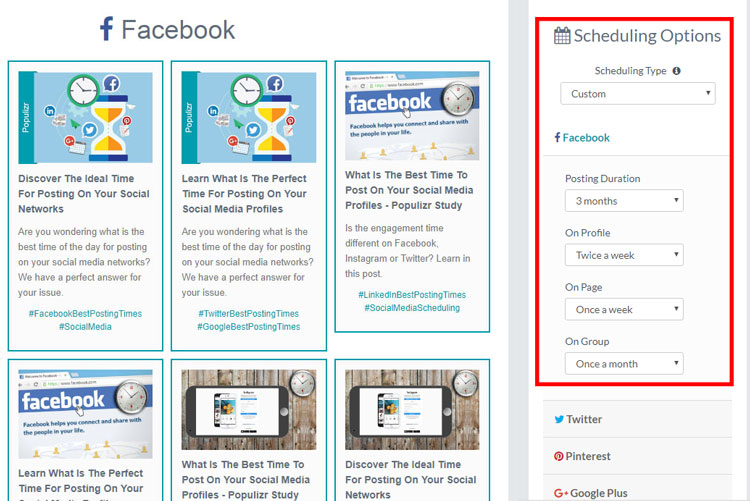
Populizr by default offers three scheduling plans for your content: Standard PlanPromotional Plan, and Evergreen Plan. Each plan has different specifications according to your needs. Populizr also offers a custom plan if you’re not pleased with the default ones. Our recommendation for you is to use one of the default plans because they are predefined and you won’t lose time. But, if you have time in hands then you can create your custom plan.
social media scheduling posting automation populizr

Note: You can schedule your content up to one year and let Populizr do the work for you.

Monday, September 10, 2018

Populizr vs. AgoraPulse – Pros, Cons & Features Comparison


If you are managing multiple social media accounts, you may know that social media marketing can be an overwhelming process sometimes. Creating content, engaging audience, scheduling posts It’s can be really difficult to control so many tasks. But, luckily there are plenty of social media tools available for you to improve your efficiency and effectively manage your profiles. Many of them have similar features, and today we will help you find out which one perfectly fits your needs.
In this post, we will elaborate two of the most popular social media platforms – Populizr and Agorapulse. They are similar in many ways because both social media applications allow you to:
  • Post to various social media networks.
  • Schedule posts at the optimal time.
  • Posts from RSS.
But there are some differences that will determine which platform is the best choice for your business. We compare Populizr and Agorapulse and we believe that by the end of this article you will decide which social media tool is the right choice for your business.

Populizr vs. AgoraPulse – Basic Overview

  • Populizr is social SEO automation platform that will help you to improve your social media marketing efforts by creating, scheduling and tracking social media campaigns. With Populizr you can create up to 25 variations from a single blog post and transform them into ongoing 25 social media campaigns ready for posting on all of your social media profiles (up to one year in advance)
  • Agorapulse is a social moderation tool that allows you to manage, collaborate and publish to the major social media posts or messages from one dashboard. Agorapulse also has a feature for social media listening where you can track your brand and easily respond to your potential and existing customers.

Monday, September 3, 2018

Social Media Marketing: What Types Of Visual Content You Should Use


Investing in visual content is essential when it comes to social media marketing. Social users enjoy seeing images instead of just reading blog posts. Appealing visual content attracts an audience and increases engagement.

Here are several types of visual content you should use when creating social media marketing campaigns:

1. Informative content

When you split your blog post with quality visual content, readers are more likely to finish reading the whole post. Quality visual content is the one that provides users with certain value. It is the content that is informative, and that social users find it meaningful when they see it. Bear in mind that visual content should always be connected to what you are talking about in your blog.

2. Promotional content

Thanks to sharing promotional content you will increase engagement and brand visibility on social media platforms. And, even if your photos are old, you can revive them by adding some stickers to gain the attention of your audience. Moreover, you can improve your promotional content by tracking what your competitors are doing, and on what their audience responds. That way you can create visual content that your audience will fall in love with.

3. Engaging content

The visual content you share should be interactive and make your audience engage. So, it should include games, polls, quizzes, etc. Your audience will easily notice this type of visual content, and it will interact with your brand.

Always create informative and engaging visual content, and promote it on social media platforms. It will boost brand awareness and generate engagement. In other words, it helps for effective social media marketing.